Kit Edge Computing Rural (ESP32 + Home Assistant Gemelo Digital)
Descripción
Código ESP32 + dashboard YAML + esquemáticos para montar un gemelo digital de tu granja con Home Assistant. Monitoreo de temperatura, humedad, riego y energía sin internet confiable.
Este producto aún no tiene un enlace de compra configurado.
Portal de Clientes (Odoo)
El procesamiento de pago, facturación y la gestión de tus descargas se realizan en nuestro espacio seguro de Odoo.
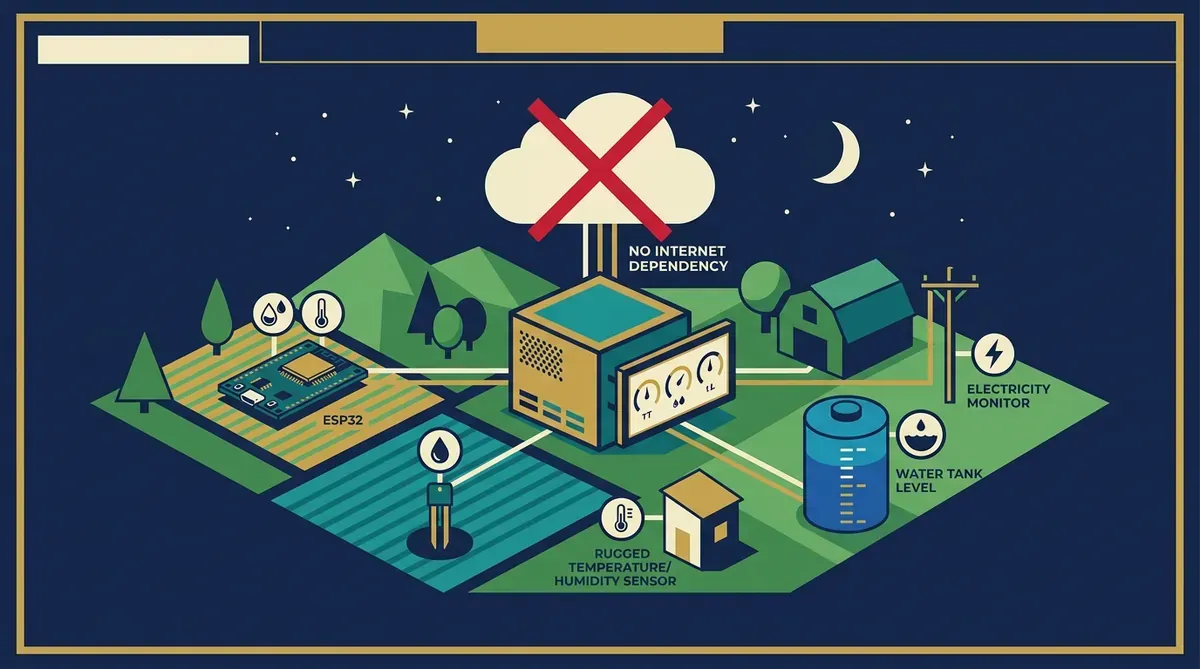
🔑 ¿Ya lo adquiriste? Inicia sesión aquí para descargarlo →En una granja rural, el internet es intermitente y la nube no es opción. Si tu sistema de monitoreo depende de una API en AWS, cada corte de internet es un punto ciego. Este kit resuelve eso con edge computing: todo el procesamiento ocurre en dispositivos locales (ESP32 + Raspberry Pi con Home Assistant).
El sistema monitorea 4 variables críticas:
- Temperatura y humedad ambiente: Sensor DHT22 en gallinero, invernadero y bodega. Alertas si la temperatura sale del rango seguro por especie.
- Humedad del suelo: Sensores capacitivos en 3 zonas de cultivo. Riego automático cuando baja del umbral configurado.
- Nivel de tanque de agua: Sensor ultrasónico HC-SR04. Alerta si el nivel baja del 20% (riesgo para los animales).
- Consumo eléctrico: PZEM-004T en el circuito principal. Detección de consumo anómalo (bomba atascada, resistencia en corto).
Todo se visualiza en un dashboard de Home Assistant con la arquitectura de gemelo digital en tres capas: adquisición (ESP32), procesamiento (HA + InfluxDB) y visualización (Grafana embebido).
- Código Arduino/PlatformIO para 4 configuraciones de ESP32: sensor ambiental, humedad de suelo, nivel de tanque, monitor eléctrico
- Esquemáticos de conexión (Fritzing + PDF): cableado de cada sensor al ESP32 con protección contra humedad y sobretensión
- Configuración YAML de Home Assistant: 4 integraciones MQTT + automatizaciones de riego, alertas y registro histórico
- Dashboard Grafana preconfigurado: 6 paneles (temperatura 24h, humedad suelo por zona, nivel tanque, consumo eléctrico, alertas, resumen semanal)
- Docker Compose para Raspberry Pi 4: Home Assistant + Mosquitto MQTT + InfluxDB + Grafana en un solo comando
- Guía de instalación en campo (PDF, 22 páginas): ubicación de sensores, protección IP67, alimentación por batería + panel solar, y mantenimiento mensual
- Firmware OTA: actualiza los ESP32 remotamente desde Home Assistant sin ir al campo
- Requisitos: Raspberry Pi 4 (4GB), 4× ESP32-WROOM-32, sensores (lista completa en el BOM), fuente de 5V/2A por ESP32, y una red WiFi local (no necesita internet, solo router local).
- Flasha los ESP32: Abre PlatformIO, selecciona la configuración del sensor que vas a instalar, edita las credenciales WiFi y el broker MQTT, y flashea por USB. Repite para los 4 dispositivos.
- Levanta el stack en la Raspberry: Copia el
docker-compose.ymla la Pi, ejecutadocker compose up -d. Home Assistant estará disponible enhttp://raspberry:8123en 3 minutos. - Conecta los sensores: Sigue los esquemáticos Fritzing para cablear cada sensor al ESP32. La guía tiene fotos de cada conexión y consejos de impermeabilización.
- Ubica los dispositivos en campo: La guía recomienda ubicaciones por tipo de sensor (ej: humedad de suelo a 10cm de profundidad, nivel de tanque a 30cm del borde superior).
- Configura alertas: En Home Assistant, ajusta los umbrales de alerta según tus especies (la guía tiene tablas de rango seguro por animal/cultivo).
- Verifica el gemelo digital: Abre el dashboard de Grafana y confirma que las 4 variables se actualizan cada 60 segundos. Si un ESP32 pierde conexión, el sistema guarda los datos en buffer y los sincroniza al reconectar.